
Let’s start at the beginning and work our way up.
Foundations#
AI vs ML vs Deep Learning#
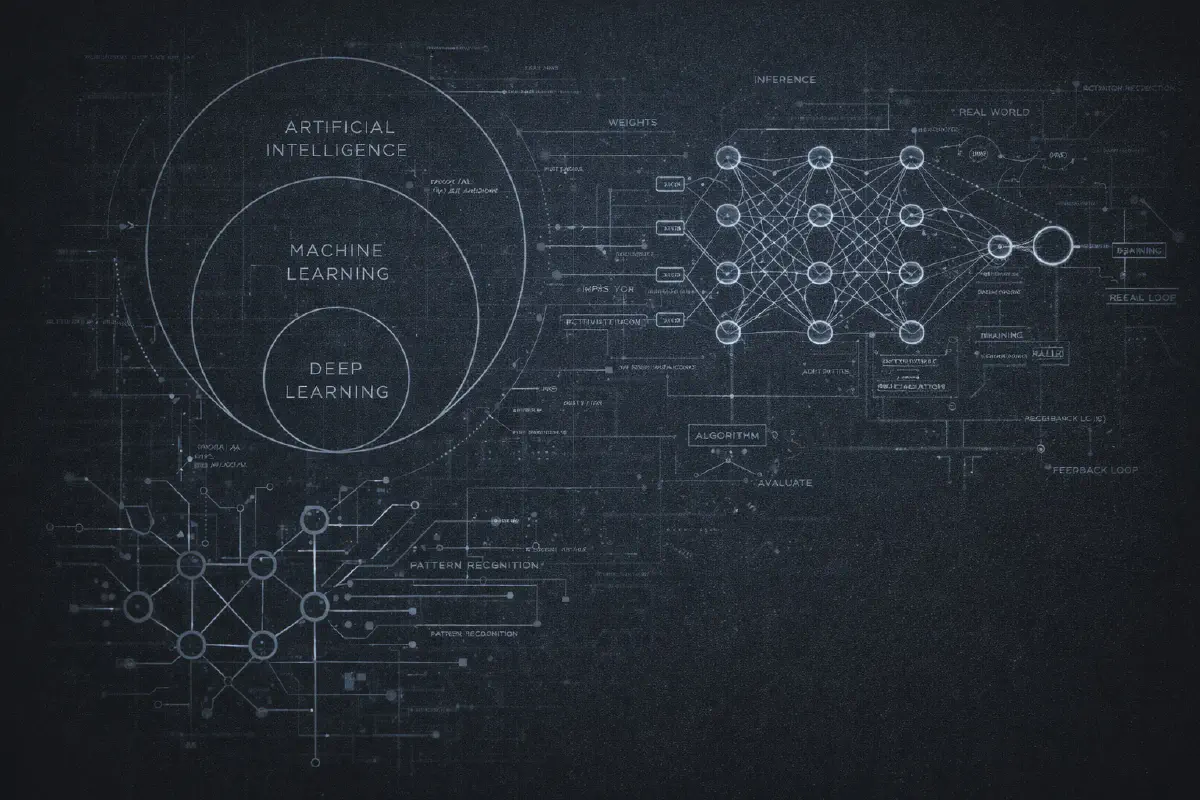
You’ve probably seen the diagram: three concentric circles with AI on the outside, Machine Learning in the middle, and Deep Learning at the core. It’s become a cliché, but it’s genuinely useful for understanding how these terms relate.
Artificial Intelligence is the broadest term. It just means “making computers do things that would require intelligence if humans did them.” That’s it. A chess program from the 1970s? AI. Your spam filter? AI. A simple if-else rule that decides whether to show you a popup? Technically, AI. The term is so broad it’s almost meaningless on its own.
Machine Learning is a subset of AI where instead of programming explicit rules, you give the computer examples and let it figure out the patterns. Instead of writing “if email contains ‘Nigerian prince’, mark as spam,” you show it 10,000 emails labeled “spam” or “not spam” and let the algorithm learn what makes spam… spammy.
Deep Learning is a subset of machine learning that uses neural networks with many layers (hence “deep”). This is where things got interesting in the 2010s. Deep learning enabled breakthroughs in image recognition, speech recognition, and eventually the language models we’re all obsessed with now.
Neural Networks#
Here’s an analogy that’s imperfect but useful: a neural network is like a very complicated spreadsheet with millions of adjustable numbers.
Data goes in one side. It gets multiplied by these numbers, added together, passed through some mathematical functions, and eventually produces an output on the other side. The “learning” part is adjusting all those numbers until the outputs match what you want.
If you want to go deeper: the network is organized into layers. Each layer contains “neurons” (really just mathematical functions). Each neuron takes inputs, multiplies them by weights, adds them up, and passes the result through an activation function. The magic happens because when you stack many layers together, the network can learn incredibly complex patterns - things no human could program by hand.
The term “neural” comes from a loose analogy to biological neurons in the brain. Don’t take this too literally. These systems work nothing like actual brains. The metaphor was useful for the original researchers in the 1940s but has become somewhat misleading.
Training vs Inference#
Every AI system has two distinct phases, and confusing them causes endless misunderstandings.
Training is the expensive part. This is when you show the model millions (or billions) of examples and adjust all those internal numbers until the model gets good at its task. Training GPT-4 reportedly cost over $100 million in compute alone. Training happens once (or periodically when you want to update the model).
Inference is the cheap part - relatively speaking. This is when you actually use the trained model. You give it an input, it produces an output. Every time you chat with ChatGPT, you’re doing inference. The model’s numbers are frozen; it’s just running calculations.
Think of it like education vs. working. Training is years of school and study. Inference is showing up to work and using what you learned. The investment happens upfront; the payoff comes during use.
Understanding LLMs#
What Makes LLMs Special#
Large Language Models are a specific type of deep learning model trained to predict text. That’s the core insight: at their heart, LLMs are just trying to predict the next word (or token) in a sequence.
“The cat sat on the ___” → “mat” (probably)
But here’s what’s wild: when you train this simple objective on trillions of words from the internet, books, code, and scientific papers, something remarkable happens. The model doesn’t just learn grammar. It learns facts, reasoning patterns, coding conventions, and even something that looks like common sense.
This is called emergent behavior - capabilities that weren’t explicitly trained but arose from the scale of training. Nobody programmed GPT-4 to write poetry or solve math problems. Those abilities emerged from the objective of predicting the next token really, really well.
Transformers and Attention#
The architecture that made modern LLMs possible is called the Transformer, introduced in a 2017 paper famously titled “Attention Is All You Need.”
The key innovation is the attention mechanism. Previous models processed text sequentially - word by word, left to right. Attention allows the model to look at all the words simultaneously and learn which words are relevant to each other.
Simple example: “The animal didn’t cross the street because it was too tired.”
What does “it” refer to? The animal. But how does the model know? The attention mechanism learns that “it” should attend strongly to “animal” and weakly to “street.” This ability to capture long-range dependencies is what makes Transformers so powerful for language.
Tokens and Context Windows#
LLMs don’t actually see words - they see tokens. A token is a chunk of text, typically a word or part of a word. “Understanding” might be one token, while “un” + “derstand” + “ing” might be three tokens depending on the model’s tokenizer.
Why does this matter? Because models have limited context windows - the maximum number of tokens they can process at once. Early GPT-3 had a 4K token context. GPT-4 Turbo expanded to 128K. Claude can handle 200K. Some newer models claim millions.
Think of the context window as the model’s working memory. Everything you want the model to consider - your question, any documents you’re sharing, the conversation history - needs to fit in this window.
| Model | Context Window | Rough Equivalent |
|---|---|---|
| GPT-3 (2020) | 4K tokens | ~3,000 words |
| GPT-4 Turbo | 128K tokens | ~100,000 words |
| Claude 3.5 | 200K tokens | ~150,000 words |
| Gemini 1.5 Pro | 1M+ tokens | ~750,000 words |
Prompt Engineering#
A prompt is just the text you send to an LLM. Your question, your instructions, any context you provide - that’s all part of the prompt.
Prompt engineering is the art (and increasingly, science) of writing prompts that get better results. It sounds silly -“engineering” your questions? - but it genuinely matters.
Some techniques that work:
- Be specific. “Write a poem” vs. “Write a 14-line sonnet about climate change in the style of Shakespeare” - the second gets dramatically better results.
- Show examples. Give the model a few examples of what you want before asking for the actual output. This is called “few-shot prompting.”
- Think step by step. Adding “Let’s think through this step by step” before a complex problem improves accuracy. This is called “chain-of-thought” prompting.
- Assign a role. “You are an expert tax accountant” focuses the model’s responses.
Temperature & Parameters#
When you use an LLM API, you can adjust several parameters that affect the output. The most important is temperature.
Temperature controls randomness. At temperature 0, the model always picks the most probable next token -deterministic, predictable, sometimes boring. At temperature 1 or higher, it’s more willing to pick less probable tokens - more creative, more varied, sometimes nonsensical.
- Temperature 0: “The capital of France is Paris.”
- Temperature 1: “The capital of France is Paris, that magnificent city of lights where revolution and romance dance through cobblestone streets…”
Other common parameters:
- Top-p (nucleus sampling): Another way to control randomness by limiting which tokens are considered.
- Max tokens: How long the response can be.
- Stop sequences: Tell the model when to stop generating.
- Frequency/presence penalty: Reduce repetition.
Hallucinations#
LLMs make things up. They state falsehoods with complete confidence. They cite papers that don’t exist. They invent statistics. This is called hallucination, and it’s not a bug that will be fixed - it’s a consequence of how these models work.
Remember: LLMs are trained to predict plausible text, not true text. If you ask about a topic where the model has limited training data, it will generate something that sounds right. The model has no internal fact-checker, no connection to ground truth, no way to say “I don’t know.”
Why does this happen?
- Training objective: Predict the next token, not verify truth.
- Probability distribution: The model samples from possibilities. Even if the true answer is most likely, sampling might pick something else.
- No knowledge cutoff awareness: The model doesn’t reliably know the boundaries of its knowledge.
Strategies to reduce hallucinations:
- Use RAG to ground responses in actual documents
- Ask the model to cite sources and verify them
- Lower temperature for factual tasks
- Use structured outputs that constrain the response
- Implement fact-checking layers
The Model Landscape#
Open vs Closed Models#
Closed source: You can use the model via API but can’t see the weights, modify the architecture, or run it yourself. OpenAI’s GPT-4, Anthropic’s Claude, Google’s Gemini.
Open source/open weights: Weights are publicly available. You can download them, run them locally, fine-tune them, modify them. Meta’s Llama, Mistral, Alibaba’s Qwen, DeepSeek, and many others.
The distinction is important but nuanced:
- “Open weights” means you can download and run the model
- “Open source” traditionally means the training code and data are also available (rare for large models)
- Licenses vary - some open models have commercial restrictions
Why does Meta release Llama for free? Strategic reasons: commoditize the complement, build ecosystem, attract talent, set standards. The cynical view: they can’t compete with OpenAI on API revenue, so they compete by making the model layer free and profiting elsewhere.
Multimodal Models#
Early LLMs only understood text. Multimodal models understand multiple types of data - text, images, audio, video.
GPT-4V can look at a photo and describe it. Claude can analyze charts and diagrams. Gemini can watch videos. This isn’t just novelty - it opens entirely new use cases:
- Screenshot a bug and ask for help debugging
- Upload a handwritten diagram and get code
- Analyze medical images
- Process video for content moderation
- Voice interfaces without separate speech-to-text
The architectures vary. Some models are trained natively multimodal. Others connect separate vision and language models. The distinction matters for performance but not for most users.
Reasoning Models#
Standard LLMs generate responses token by token without explicit “thinking.” Reasoning models take a different approach - they spend extra compute thinking through problems before answering.
OpenAI’s o1 and o3 models pioneered this approach. Instead of immediately responding, these models generate internal reasoning chains (sometimes hidden from users), consider multiple approaches, and check their work before producing a final answer.
The results are striking: reasoning models dramatically outperform standard LLMs on math, coding, science, and logic problems. o3 achieved scores on certain benchmarks that were thought to be years away.
The tradeoff: reasoning models are slower and more expensive. A simple question that GPT-4 answers instantly might take o1 several seconds (and 10x the cost) as it “thinks.” For simple tasks, that’s wasteful. For hard problems, it’s worth it.
When to use reasoning models:
- Complex math or logic problems
- Multi-step coding challenges
- Tasks requiring careful analysis
- Anything where accuracy matters more than speed
When standard LLMs are better:
- Simple Q&A
- Creative writing
- Real-time applications
- Cost-sensitive use cases
Consumer AI Products#
Before diving deeper into technical details, let’s map the products you’ve probably already used:
ChatGPT (OpenAI) - The product that started the mainstream AI wave. Access to GPT-4, o1, DALL-E for images, and various plugins. The benchmark everyone else is compared against.
Claude (Anthropic) - Known for strong writing, long context windows, and nuanced reasoning. Claude.ai is the consumer interface; the API powers many applications.
Gemini (Google) - Deeply integrated with Google’s ecosystem. Access via gemini.google.com and increasingly embedded in Search, Docs, Gmail, and Android.
Copilot (Microsoft) - Microsoft’s AI layer across their products. Different from GitHub Copilot (coding) - this is the consumer assistant in Windows, Edge, and Microsoft 365.
Perplexity - AI-native search engine. Answers questions with citations and sources. A glimpse of what search might become.
Others worth knowing: Grok (xAI, integrated into X/Twitter), Pi (Inflection), Le Chat (Mistral), DeepSeek Chat, and many regional/specialized alternatives.
Running Models Locally#
Why Run Locally?#
Cloud models run on someone else’s servers. You send requests over the internet and pay per use. OpenAI, Anthropic, Google - this is their business.
Local models run on your own hardware. Your laptop, your servers, your data center. Data never leaves your control.
Why run locally?
- Privacy: Sensitive data stays on-premise
- Cost: No API fees (but hardware isn’t free)
- Latency: No network round trip
- Availability: Works offline, no rate limits
- Control: No terms of service, no content filters you didn’t choose
The gap between local and cloud has shrunk dramatically. For many practical applications, local models are good enough - especially for coding, writing, and analysis tasks.
The tradeoff: frontier capabilities still require cloud. If you need the absolute best performance on hard reasoning tasks, GPT-4, Claude, or Gemini are cloud-only. But that gap narrows with every release.
Ollama#
Ollama has become the de facto standard for running models locally. It makes what used to be a complex process trivially easy.
# Install and run a model in two commands
ollama pull llama3.2
ollama run llama3.2
That’s it. You’re chatting with a capable LLM running entirely on your machine.
Ollama handles the complexity: downloading models, managing memory, optimizing for your hardware, and providing both a CLI and a local API. It supports dozens of models - Llama, Mistral, Qwen, Phi, CodeLlama, and many more.
Key features:
- Simple CLI interface
- OpenAI-compatible API (easy to swap into existing code)
- Model library with one-command downloads
- Works on Mac, Linux, and Windows
- GPU acceleration when available
For developers, Ollama’s local API means you can develop against local models and switch to cloud APIs for production - or vice versa - with minimal code changes.
Hardware Considerations#
Running models locally requires hardware. Here’s what matters:
GPU vs CPU: GPUs dramatically accelerate inference. A model that takes 30 seconds per response on CPU might take 2 seconds on GPU. Apple Silicon Macs blur this line - their unified memory and Neural Engine make them surprisingly capable for local inference.
Memory (VRAM/RAM): This is usually the limiting factor. Models need to fit in memory. A 7B parameter model needs roughly 4-8GB. A 70B model needs 35-70GB. Quantization (discussed below) reduces these requirements.
Quantization: Reducing the precision of model weights from 32-bit to 16-bit, 8-bit, or even 4-bit. This shrinks memory requirements and speeds up inference with minimal quality loss. Most local models are distributed in quantized formats (GGUF, GPTQ, AWQ).
Practical guidance:
- Mac with 16GB+ RAM: Can run 7B-13B models comfortably
- Mac with 32GB+ RAM: Can run 30B+ models
- PC with RTX 3090/4090 (24GB VRAM): Can run most models up to 70B (quantized)
- No GPU: Still works, just slower. Fine for development and experimentation.
Customization & Knowledge#
Fine-Tuning vs RAG#
You’ve got a base LLM. You want to make it better for your specific use case. Two main approaches:
Fine-Tuning#
Take an existing model and continue training it on your own data. The model’s weights actually change. After fine-tuning, the model “knows” your information natively.
Pros: Fast inference, deep integration of knowledge, can learn new styles or behaviors. Cons: Expensive, requires ML expertise, knowledge can become stale, risk of catastrophic forgetting (model gets worse at other tasks).
RAG (Retrieval-Augmented Generation)#
Keep the model as-is. When a question comes in, first search your knowledge base for relevant documents, then include those documents in the prompt alongside the question.
Pros: Cheaper, knowledge stays up-to-date, no training required, easy to audit (you can see what was retrieved). Cons: Slower (two-step process), limited by context window, retrieval quality matters a lot.
Embeddings & Vector DBs#
This is the technology that makes RAG work - and it’s genuinely clever.
An embedding is a way to represent text (or images, or anything) as a list of numbers - a vector. The magic: similar things have similar vectors. “Dog” and “puppy” have vectors that are close together. “Dog” and “democracy” are far apart.
You create embeddings using embedding models (different from LLMs, though some LLMs have embedding capabilities). OpenAI, Cohere, Voyage, and many others offer embedding APIs. Open source options like BGE and E5 work great too.
A vector database is a database optimized for storing and searching these vectors. When you ask “What’s our refund policy?”, the system:
- Converts your question to a vector
- Searches the vector database for similar vectors
- Returns the documents those vectors represent
- Feeds those documents into the LLM with your question
Popular vector databases include Pinecone, Weaviate, Chroma, Qdrant, and Milvus. Postgres with pgvector works surprisingly well for many use cases.
Evaluation#
Benchmarks#
How do you know if one model is “better” than another? Benchmarks attempt to answer this by testing models on standardized tasks.
Common benchmarks:
- MMLU (Massive Multitask Language Understanding): Multiple choice questions across 57 subjects. Tests general knowledge.
- HumanEval: Coding problems. Tests programming ability.
- GSM8K: Grade school math word problems. Tests mathematical reasoning.
- HellaSwag: Common sense reasoning about everyday situations.
- TruthfulQA: Tests whether models give truthful answers vs. convincing-sounding nonsense.
The problem with benchmarks: They’re gameable. Models can be trained specifically to do well on popular benchmarks without actually improving at real tasks. A model that scores 90% on MMLU might still fail at your specific use case.
Evals#
Evals (evaluations) are tests you create for your specific use case. Unlike benchmarks, evals measure what actually matters for your application.
Building a customer service bot? Your evals might test:
- Does it correctly answer questions from your FAQ?
- Does it appropriately escalate to humans when needed?
- Does it stay on-brand and follow your tone guidelines?
- Does it refuse to make promises the company can’t keep?
Why evals matter:
- Regression detection: When you change prompts or switch models, evals catch problems before users do.
- Comparison: Objectively compare different models, prompts, or approaches for your use case.
- Iteration: You can’t improve what you can’t measure. Evals make improvement systematic.
Building good evals:
- Start with real user queries and expected responses
- Include edge cases and adversarial examples
- Test for both what the model should do AND what it shouldn’t
- Automate so you can run evals on every change
LLM as a Judge#
Here’s a clever technique: use one LLM to evaluate the outputs of another LLM.
Instead of manually reviewing hundreds of responses, you can prompt a model to act as a judge:
You are evaluating the quality of an AI assistant's response.

User question: {question}
Assistant response: {response}

Rate the response on:
1. Accuracy (1-5): Is the information correct?
2. Helpfulness (1-5): Does it actually help the user?
3. Clarity (1-5): Is it easy to understand?

Explain your reasoning, then provide scores.
Why this works:
- Scales to thousands of evaluations
- More consistent than human reviewers (less fatigue)
- Can evaluate nuanced qualities that are hard to test programmatically
- Cheaper and faster than human evaluation
Limitations:
- The judge model has its own biases and limitations
- Can miss errors it would make itself
- Struggles with domain-specific accuracy without grounding
- Not a replacement for human evaluation entirely - more of a complement
Agents & Automation#
What Are Agents?#
The term “agent” gets thrown around a lot. Here’s a working definition: an agent is an LLM that can take actions in the world, not just generate text.
A chatbot answers your questions. An agent might answer your questions and book a restaurant reservation, send an email, query a database, or write and execute code to solve a problem.
What makes something an agent vs. just an LLM?
- Goals: Agents work toward objectives, not just respond to prompts.
- Actions: Agents can do things, not just say things.
- Autonomy: Agents make decisions about how to achieve goals.
- Loops: Agents often run in loops - observe, think, act, repeat.
The simplest agent pattern: give an LLM access to tools and let it decide which tools to use. “Find flights from London to Tokyo next week, check my calendar, and book the cheapest option that works with my schedule.” The agent breaks this down, calls flight APIs, calls calendar APIs, and executes the booking.
Agents vs Workflows#
An important distinction that often gets blurred:
Workflows are deterministic. You define the steps: first do A, then do B, then if X do C else do D. The LLM might power individual steps, but the orchestration is coded.
1. Extract entities from email (LLM)
2. Look up customer in database (code)
3. Generate response draft (LLM)
4. Send for human review (code)
Agents are autonomous. You give them a goal and tools, and they figure out the steps. The LLM decides what to do next based on the current state.
Goal: "Resolve this customer complaint"
Tools: [email, database, refund_system, escalation]
→ Agent decides what to do, in what order
When to use workflows:
- Predictable, well-understood processes
- When you need reliability and auditability
- Regulated environments
- High-volume, low-complexity tasks
When to use agents:
- Novel or variable tasks
- When the steps aren’t known in advance
- Complex reasoning required
- When flexibility matters more than predictability
The cost equation: Workflows are significantly cheaper. You’re paying for a fixed number of LLM calls per run - predictable, optimizable, auditable. Agents are expensive because they think. Every decision point - “what tool should I use?”, “did that work?”, “what’s next?” - is an LLM call. A workflow that makes 3 LLM calls might become an agent that makes 15-30 calls to solve the same problem, because the agent is reasoning about how to solve it, not just executing predefined steps. For well-understood tasks at scale, workflows win on cost. For complex, variable problems where you can’t predefine the steps, agents are worth the premium.
Tool Use & Function Calling#
For agents to take actions, they need tools - functions they can call. This capability is usually called function calling or tool use.
Here’s how it works:
- You define tools with names, descriptions, and parameters (usually as JSON schemas)
- You include these definitions in your prompt/API call
- The model can choose to “call” a tool instead of generating text
- Your code executes the function and returns results to the model
- The model uses those results to continue
Example tool definition:
{
  "name": "get_weather",
  "description": "Get current weather for a city",
  "parameters": {
    "type": "object",
    "properties": {
      "city": {"type": "string", "description": "City name"},
      "units": {"type": "string", "enum": ["celsius", "fahrenheit"]}
    },
    "required": ["city"]
  }
}
When you ask “What’s the weather in Tokyo?”, the model doesn’t hallucinate - it calls get_weather(city="Tokyo"), gets real data, and responds with facts.
Every major model provider now supports function calling: OpenAI, Anthropic, Google, and others. The syntax varies slightly but the concept is the same.
MCP Protocol#
Model Context Protocol (MCP) is an open standard for connecting AI models to tools and data sources. Think of it as USB-C for AI - a universal connector that means you don’t need a different cable for every device.
Before MCP, every integration was custom. Want your AI to access GitHub? Write a GitHub integration. Salesforce? Another integration. Your internal database? Yet another. This doesn’t scale.
MCP defines a standard way for AI clients (like Claude, ChatGPT, or your custom agent) to discover and use tools from MCP servers. An MCP server might expose:
- Tools: Functions the AI can call
- Resources: Data the AI can read
- Prompts: Templates for common tasks
The implications are significant:
- Build an MCP server once, every compatible AI can use it
- Tools become portable and reusable
- Security and permissions can be standardized
- The ecosystem compounds - more servers means more capable agents
For more on MCP, I wrote a deeper dive: MCP Servers: The USB-C Moment for AI Agents.
Agentic Patterns#
As agents have matured, common patterns have emerged:
ReAct (Reason + Act): The agent alternates between reasoning (“I need to find the user’s order history”) and acting (calling the order API). This explicit reasoning step improves reliability.
Planning: Before acting, the agent creates a plan: “To resolve this, I’ll need to 1) look up the order, 2) check inventory, 3) process the refund, 4) send confirmation.” Plans can be validated before execution.
Reflection: After completing a task (or failing), the agent reviews what happened: “The refund failed because the order was too old. I should have checked the refund policy first.” This enables learning and self-correction.
Tool selection: When an agent has many tools, choosing the right one becomes non-trivial. Techniques include tool descriptions, few-shot examples, and hierarchical tool organization.
Human-in-the-loop: For high-stakes actions, agents can pause and request human approval before proceeding. Good agents know when they’re uncertain.
Skills#
Skills are reusable, specialized prompts that extend what an agent can do. Think of them as “expert modes” you can plug into an agent - a skill for code review, a skill for writing documentation, a skill for analyzing security vulnerabilities.
Unlike tools (which are functions that do things), skills are instructions that shape how the agent thinks and responds. A tool calls an API. A skill tells the agent “when asked about X, approach it this way, consider these factors, and format your response like this.”
Why skills matter:
- Specialization without fine-tuning: You get expert behavior without training a new model.
- Composability: Mix and match skills for different tasks.
- Shareability: A well-crafted skill can be used across teams, projects, or even shared publicly.
- Context efficiency: Instead of explaining your requirements every time, encode them once in a skill.
Where skills live:
Skills can be injected at different points in the agent’s context:
- System prompt: The most common approach. Skills become part of the agent’s base instructions, always active.
- User message prefix: Dynamically prepended to user requests. Useful for task-specific skills.
- Tool descriptions: Skills can be embedded in tool definitions, guiding how the agent uses specific tools.
- MCP prompts: MCP servers can expose skills as “prompts” - reusable templates that clients can discover and invoke.
How skills influence context:
Every skill consumes tokens from your context window. This creates tradeoffs:
- More skills = more capable agent, but less room for conversation history
- Detailed skills = better behavior, but higher token cost per request
- Always-on skills vs. on-demand skills = reliability vs. efficiency
Smart agent frameworks manage this by loading skills dynamically - activating relevant skills based on the task and deactivating others.
Example skill structure:
## Code Review Skill

When reviewing code, you should:
1. Check for security vulnerabilities (injection, XSS, auth issues)
2. Identify performance concerns
3. Evaluate readability and maintainability
4. Suggest specific improvements with code examples

Format your review as:
- Summary (1-2 sentences)
- Critical issues (if any)
- Suggestions (bulleted list)
- Overall assessmentCoding Agents#
Why They Matter#
Coding agents represent one of the most tangible applications of AI - they actually write code, and the code actually works. This isn’t theoretical; developers are shipping features faster because of these tools.
The impact is immediate and measurable: less time on boilerplate, faster debugging, easier exploration of unfamiliar codebases. For many developers, coding agents have become as essential as their IDE.
The Landscape#
Claude Code - Anthropic’s terminal-based coding agent. Lives in your CLI, understands your entire codebase, can read files, write code, run commands, and iterate on feedback. Designed for developers who live in the terminal.
Cursor - An AI-native IDE built from the ground up around AI assistance. Not just autocomplete - you can chat with your codebase, generate entire features, and have the AI make sweeping changes across files. The closest thing to pair programming with an AI.
GitHub Copilot - The original and most widely deployed. Started as autocomplete, evolved into chat, now includes Copilot Workspace for larger tasks. Deep GitHub integration.
Windsurf - Codeium’s AI IDE, positioning itself as an alternative to Cursor. Strong emphasis on speed and understanding large codebases.
Cody (Sourcegraph) - Focuses on codebase understanding. Particularly strong for large, complex codebases where context is critical.
Continue - Open-source coding assistant that works with any IDE. Bring your own model (local or cloud). Good for teams that want control over their AI setup.
OpenCode - Open-source alternative to Claude Code. Terminal-based, model-agnostic, community-driven development.
Aider - Another excellent open-source terminal coding agent. Known for its git integration and ability to work with multiple files coherently.
Next Steps#
You’ve made it through the fundamentals. Where next?
Building Things#
- Start simple. Use an API (OpenAI, Anthropic, etc.) and build a basic chatbot or RAG system. Don’t overthink the stack initially.
- Try local models. Install Ollama and run Llama or Qwen on your laptop. It’s surprisingly easy.
- Explore agents. Check out frameworks like LangChain, LlamaIndex, or CrewAI for building agent systems.
- Learn MCP. The official docs are solid.
- Build evals early. Whatever you build, create evals from day one. You’ll thank yourself later.
Understanding the Field#
- Follow the research. ArXiv papers, Google Scholar alerts on topics you care about.
- Read the hype critically. Most “breakthroughs” are incremental. Look for reproducible results and real benchmarks.
- Experiment yourself. Intuition about what works comes from hands-on experience, not reading.
Resources#
- Hugging Face - Models, datasets, and an incredible community
- Papers With Code - Research papers with implementations
- Ollama - Dead simple local model running
- LangChain / LlamaIndex - Popular frameworks for building with LLMs
- Model Context Protocol - The MCP specification and SDKs
- Chatbot Arena - Compare models head-to-head with human voting
AI in 2026 is simultaneously overhyped and underhyped. The technology is genuinely transformative - but it’s also genuinely limited. LLMs make things up. Agents are brittle. Costs are high. Progress is fast but uneven.
The best approach is pragmatic: understand the fundamentals, experiment with real problems, stay skeptical of grand claims, and build things. The people who will thrive in this era aren’t the ones who can recite every acronym - they’re the ones who can ship products that actually work.
Now go build something.