
AI coding agents stopped being a demo about a year ago. Claude Code, Codex, opencode, Gemini CLI, Copilot CLI, Cursor Agent - they all genuinely write code now. The bottleneck moved. It’s not “can the agent build this.” It’s “can I keep track of what five agents are doing across six repos without losing my mind.”
I started running into that wall every day. So I built a tool. I called it Watchfire.
Watchfire is an open-source control room for running AI coding agents across projects: it isolates the work, manages tasks and git worktrees, and tells you when attention is actually needed. It’s for a solo developer or a small team already running multiple long-lived agent tasks. It is not a replacement for your IDE, and it’s overkill for a one-off Claude Code session.
Six months in, it has an uncomfortable property: Watchfire builds Watchfire. Every feature below was specced, executed and merged by agents that Watchfire itself was orchestrating - including the release that let your agent do the same thing. That loop is the reason this post exists, and I’ll show you the receipts.
But the most useful thing I’ve learned in six months isn’t about generating code at all. It’s about the projects where the tasks tell the agent not to decide. That’s the second half of this post, and it’s the half I’d read first.
It’s open source, Apache 2.0, and runs on macOS, Linux and Windows:
The Problem That Forced the Tool#
For a few weeks at the start of the year I was bouncing between five projects and three terminal windows. Each project had its own Claude Code session. Each session had its own permission prompts, its own rate-limit hiccups, its own half-finished task I’d forget about as soon as I switched windows. The agents were doing great work. I was the slow piece.
A few things in particular:
- Babysitting prompts. Every shell command needed approval. Every file write needed approval. I’d come back from a coffee to find an agent paused on the second prompt of a 50-step task.
- No aggregate view. What’s actively running? What’s blocked? What did agent #3 do in the last hour while I was looking at agent #1? Nothing told me.
- Silent failures. Agents would die on a merge conflict, a rate limit, a malformed YAML, and just… stop. I’d notice an hour later.
- Lost context. Switching between projects meant re-explaining conventions, re-pasting CLAUDE.md, re-loading the mental model of what was where.
Watchfire started as a Sunday-afternoon escape from that pain.
What Watchfire Is Today#
Four things it actually does for you:
- You stop approving things. Work is filed as tasks with a prompt and acceptance criteria, then executed unattended. You come back to a merged branch, not a paused prompt.
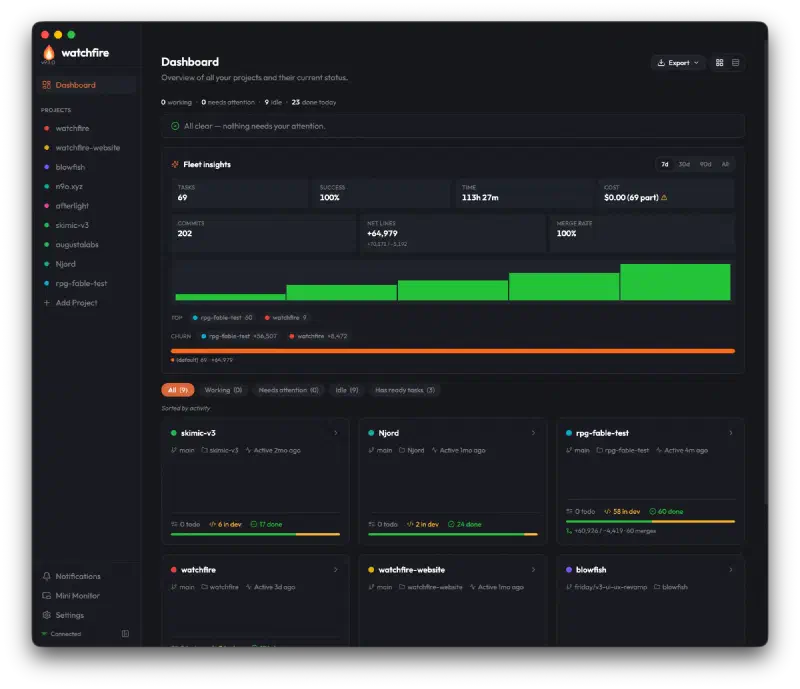
- You see the whole fleet at once. One dashboard across every project: what’s running, what’s blocked, what finished today, what it cost. The attention banner stays quiet unless something genuinely needs you.
- Nothing collides. Every task runs in its own git worktree behind an OS sandbox, so parallel agents across projects can’t corrupt each other’s work and have a sharply reduced ability to reach your credentials.
- The work leaves a paper trail. Per-task metrics - duration, cost, commits, files, lines, how the merge landed - roll up into per-project and fleet-wide Insights, plus CSV/Markdown exports and a weekly digest.
It currently supports six agent backends through a single Backend interface - Claude Code, OpenAI Codex, opencode, Gemini CLI, GitHub Copilot CLI, and Cursor Agent - each in its own isolated config dir (CODEX_HOME, OPENCODE_CONFIG_DIR, COPILOT_HOME) so credentials and prompts don’t bleed between sessions. You can override the agent per task.
Two Layers of Blast Radius#
This is the part I’d want to know about if someone else had built it, because “walk away and let it run” is only reasonable if you know what “it” can reach.
Every task runs behind two independent layers of isolation. The first is a git worktree: each task gets its own watchfire/<task_number> checkout, so two agents in the same repo can’t see each other’s half-finished edits, and nothing lands on your branch until the run succeeds and merges. The second is an OS-level sandbox around the agent process - Seatbelt on macOS, Landlock on Linux 5.13+, with a bubblewrap mount-namespace fallback on older kernels.
The sandbox is a filesystem allowlist with opinions. Writable: the project directory, temp, and the caches real builds need (~/.npm, ~/.cargo, ~/go, ~/.rustup). Readable: compilers, system libraries, tool config. Blocked outright: ~/.ssh, ~/.aws, ~/.gnupg, .netrc, .npmrc, .env files, .git/hooks, and on macOS your personal folders. An agent looking for deploy keys in those protected locations finds nothing there.
Two honest caveats, both of which the sandboxing post states plainly rather than burying: the sandbox is filesystem-focused and does not block outbound HTTPS today, and Windows currently runs unsandboxed - worktree isolation applies, the OS layer doesn’t. Both are on the list.
That combination is what makes everything else in this post defensible. Bypassing permission prompts is only sane when the blast radius is a disposable worktree and a filesystem the agent can’t wander out of.
Under the Hood#
A Go daemon (watchfired) owns orchestration, sandboxing, PTY emulation, worktrees and a gRPC server. Three clients talk to it: a Bubble Tea TUI for terminal and SSH work, an Electron + React GUI that opens one OS window per project, and a thin CLI. The daemon advertises its port through ~/.watchfire/daemon.yaml, and a flock on the lockfile guarantees one daemon per user - no more “two windows fighting over the same worktree.” Agent output streams through a PTY parsed daemon-side by a real VT emulator (hinshun/vt10x), so ANSI renders properly everywhere.
State is YAML on disk, everywhere - a registry, global settings, integrations, and per-project project.yaml plus .watchfire/tasks/<n>.yaml files - with atomic writes (tmp + fsync + rename) since v6.0, which closed a data-loss race the hard way. Everything is greppable, diffable and survives git.
And since v9 there’s a fourth client that isn’t a UI at all: watchfire mcp serve exposes the whole orchestrator as an MCP server. That one gets its own section.
A Quick Tour#
The thing I missed most in those early terminal-only days was a dashboard. Not a list of projects - a status. Where are we? What’s stuck? What did agents do today? That’s the screenshot at the top of this post: a pulse line for working / needs attention / idle / done today, an all-clear banner, fleet insights with 7d/30d/90d/All windows, filter pills, and a card per project carrying its own task counts and code churn.
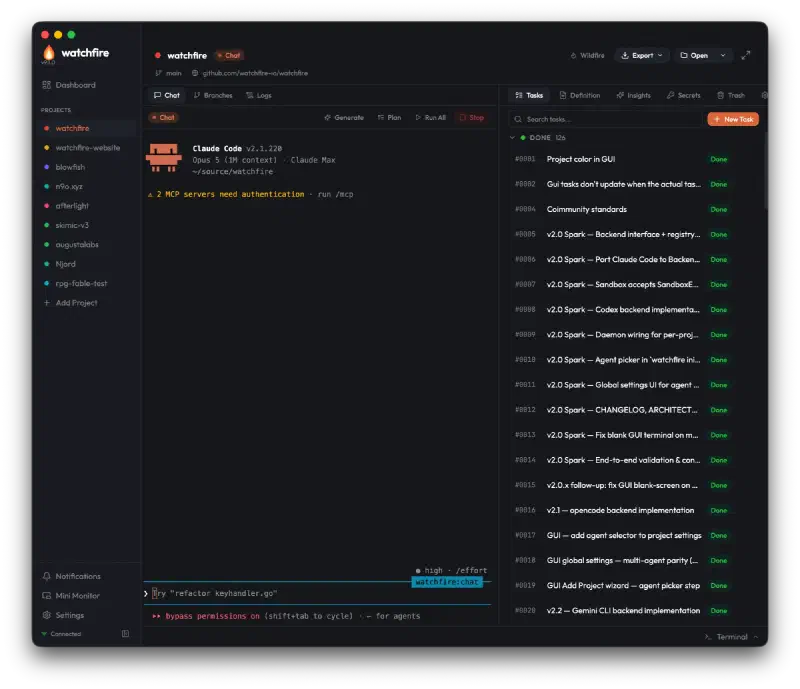
Click a project and it opens in its own window - the v8 “Inferno” redesign. The layout is chat-primary: the agent conversation is the wide pane, and Tasks / Definition / Insights / Secrets / Trash / Settings live in a tabbed sidebar on the right:
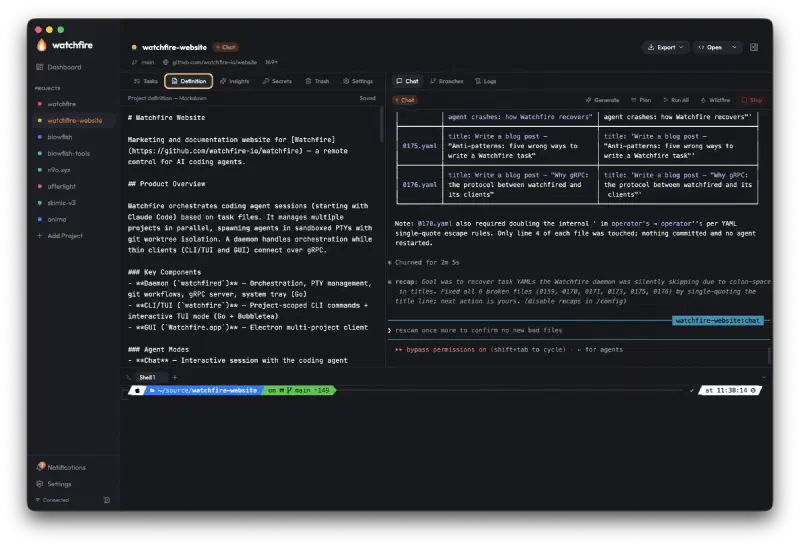
Every project has a markdown Definition that gets folded into the prompt context. It’s the project’s standing brief - what it is, what conventions matter, what files matter - and it’s what makes a multi-project workflow feasible, because agents start with context instead of a blank brain:
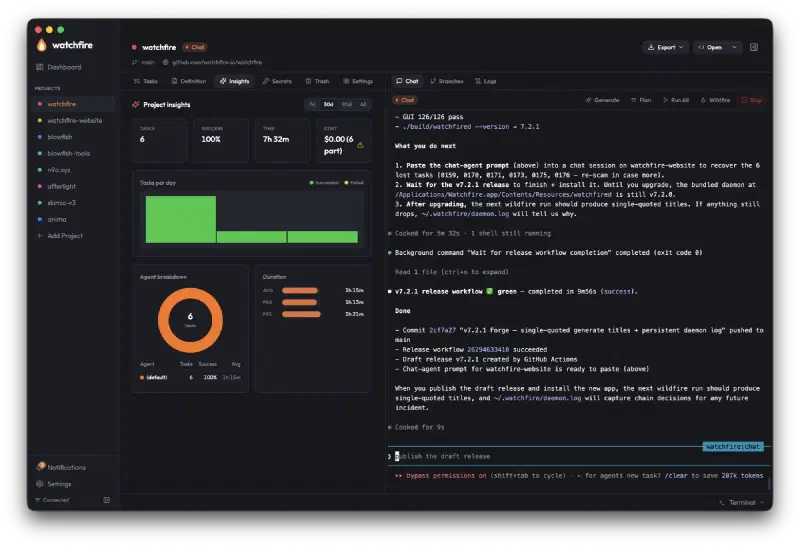
Per-project Insights answer “what did I actually do this week” - tasks per day, agent breakdown, duration distribution, cost, and since v8 the code metrics too:
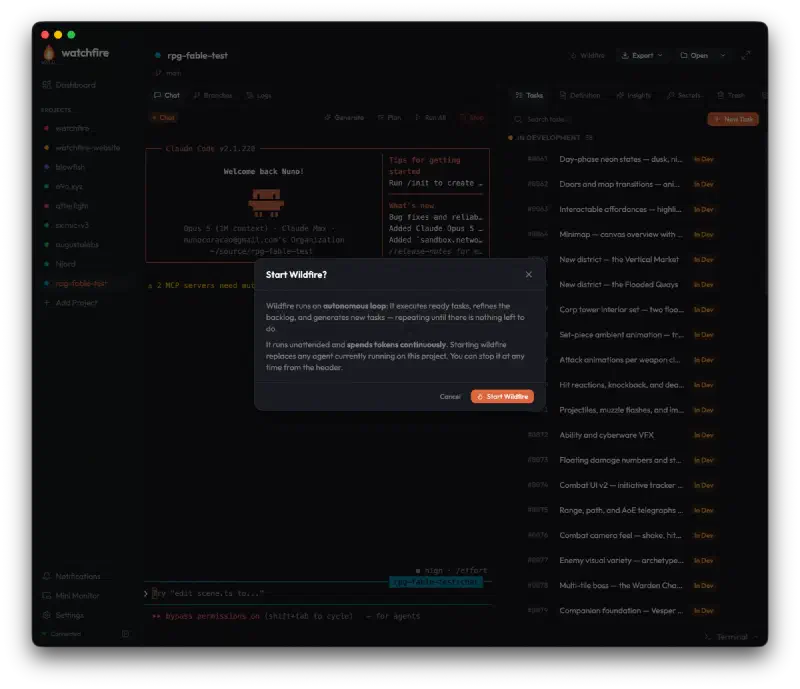
Wildfire is the autonomous mode: Watchfire executes ready tasks, refines drafts, and generates new ones in a loop until the project definition says done. It got a first-class GUI in v8 - a start button with a confirmation modal, and a live phase stepper while it runs. The Inside Wildfire mode post has the full mechanics:
Global Settings grew searchable sub-pages carrying the fleet-wide defaults - which agent new projects get, and whether they auto-merge, auto-delete branches and auto-start ready tasks, all overridable per project. The Open split-button detects which editor CLIs are actually installed, from VS Code and Cursor through Zed, JetBrains and Xcode, and works even when the GUI’s PATH has been stripped.
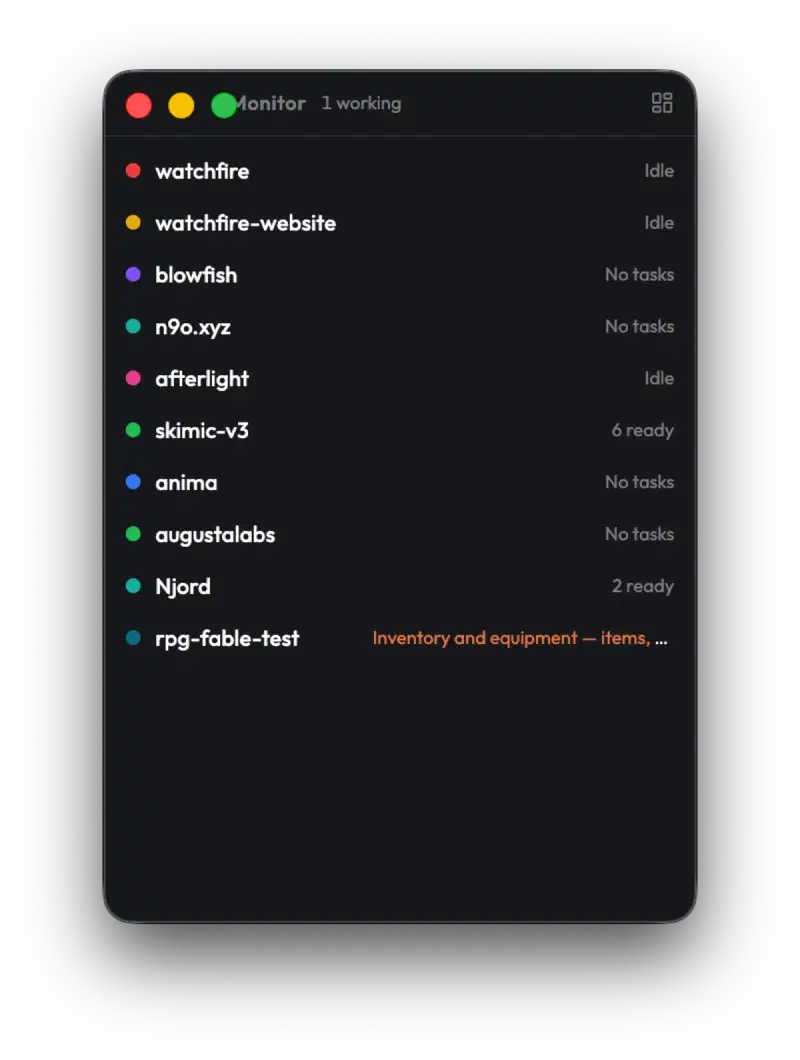
For the hours when Watchfire shouldn’t be the thing on screen, v8 added the Mini Monitor - a frameless always-on-top strip - and a tray menu carrying the same status plus the daemon’s port:
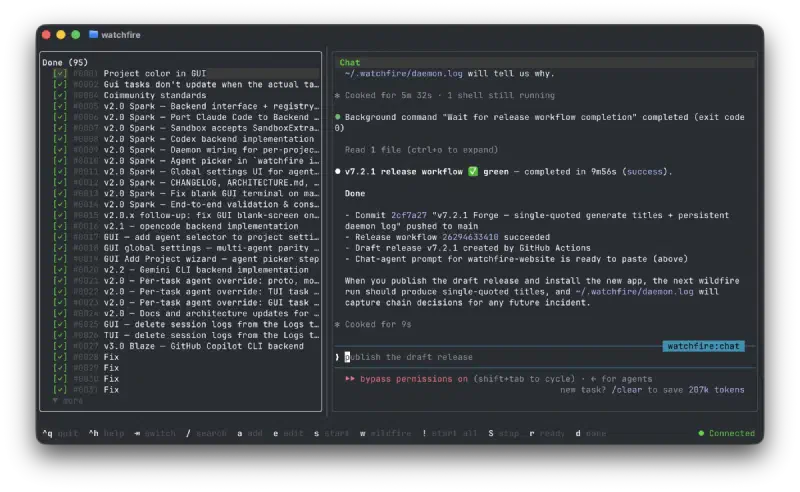
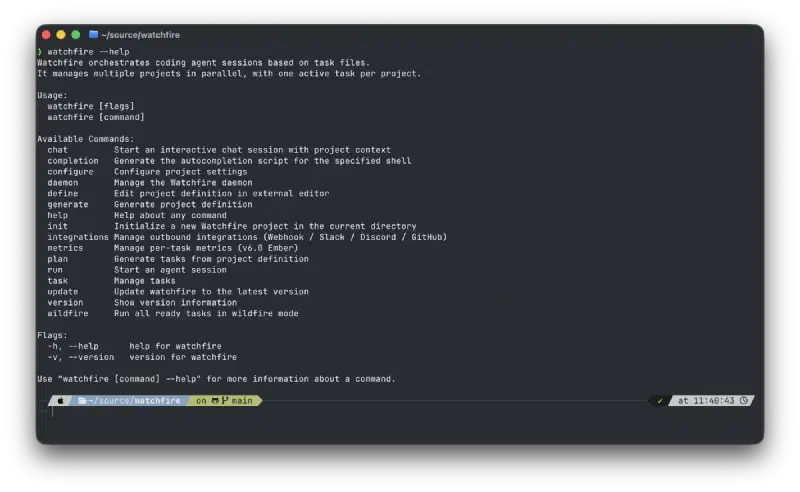
The same workflow exists in a TUI, because half of my dev work happens over SSH to a Linux box, where tasks are just as editable as in the GUI. A thin CLI covers everything the daemon can do:
The Proof: 30 Days of Vibe Coding#
In April I committed to 30 days, 30 AI-built projects. One a day, every day. Claude Code on a Max 20x plan, Watchfire orchestrating, Context7 MCP feeding fresh docs to agents.
The plan was to ship side projects. What I didn’t expect: Watchfire became the project being stress-tested every single day, and the issues queue I cut for myself turned into the most aggressive product roadmap I’ve ever run.
A few representative beats from the series:
- Day 1 (Platformer) - “I didn’t sit there approving every file change. Watchfire queued up the tasks and worked through them. I came back to a working game.” The walk-away loop worked on day one. It also instantly exposed everything that wasn’t ready: garbled terminal output, agent restart loops on rate limits, the sandbox blocking
~/Desktopon macOS. - Day 12 (Wordle) - “Each task layered on a specific category of polish, and none of them broke what came before.” The incremental task model was the only reason that worked. Big-bang prompts kept breaking; many small scoped tasks didn’t.
- Days 27-28 (Terminal, ideA) - Cross-platform native CI/CD hell. “Watchfire helped a lot here by going on endless loops of debugging, testing, running, failing, and repeating until the pipeline finally worked. Without that persistence, I would have given up on cross-platform releases.”
- Day 30 (miniOs) - “Day 1, I built a platformer from one sentence. Day 30, I built an operating system that contains the platformer, and everything I made in between.”
Across the 30 days: ~450 tasks executed through Watchfire and ~1,200 commits, with about 326k lines changed - that’s Watchfire’s own tally of insertions plus deletions, a measure of churn rather than a productivity claim. Five major Watchfire versions shipped during the challenge alone (Ember → Spark → Blaze → Beacon → Flare).
Somewhere in there the tool crossed a line I hadn’t planned for.
The Meta Bit#
There’s a moment - somewhere in the second week - when the loop closes. You’re using Watchfire to build a project. The project surfaces a bug in Watchfire. You file the bug as a Watchfire task. Watchfire runs an agent to fix Watchfire. The fix ships. Then you go back to the original project, still waiting in another tab.
The first time it happens it’s funny. By the tenth time it’s just the workflow. By the wrapup it’s the whole point:
Or more accurately, Watchfire is building Watchfire now. The tool orchestrates its own development.
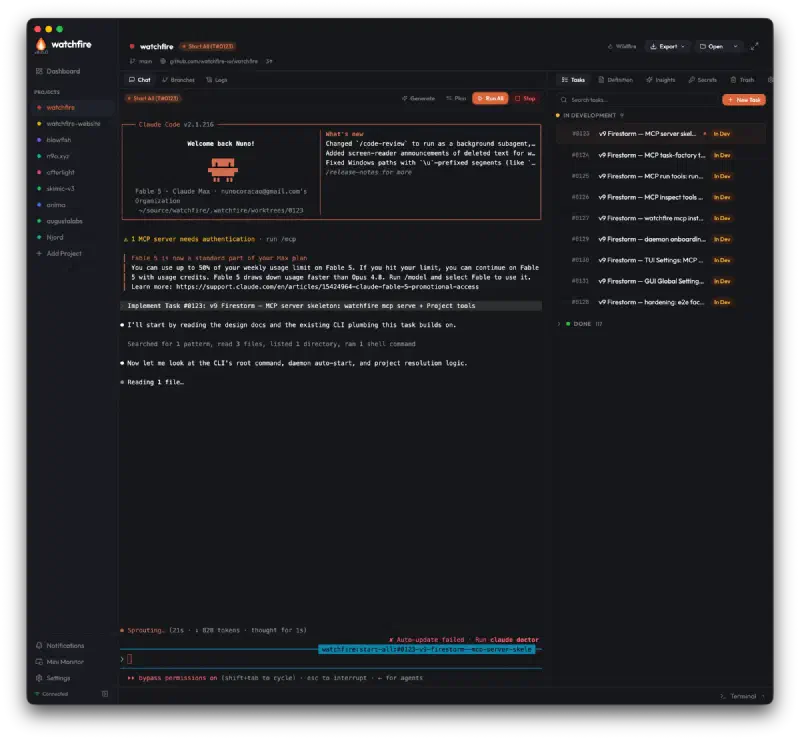
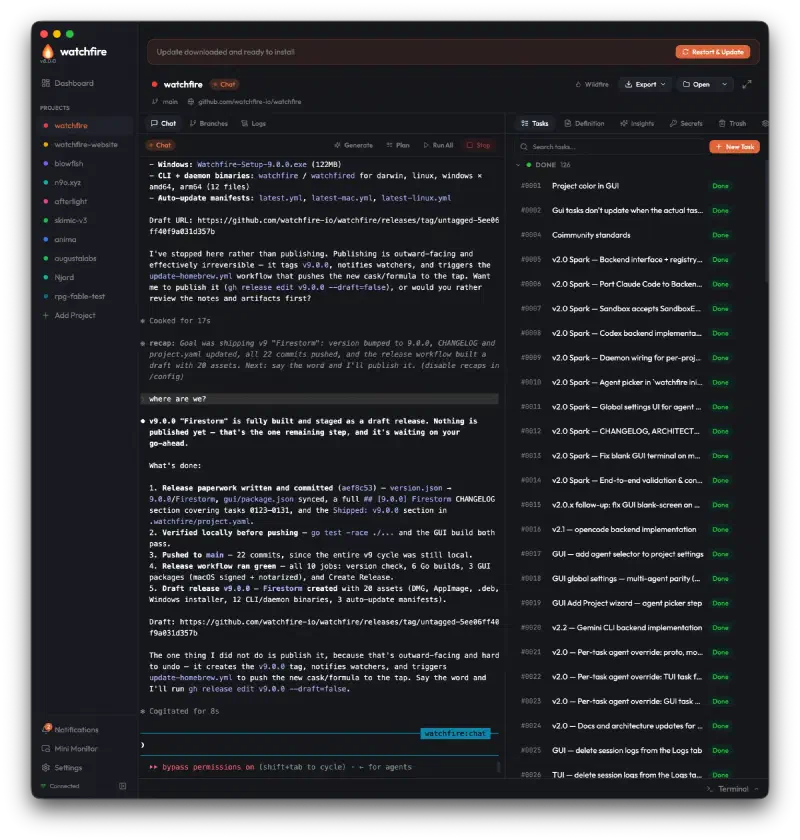
That was written in May. In July it stopped being a line in a blog post and became a release process. Every task in v9’s queue - the MCP server skeleton, the task-factory tools, the run tools, the inspect tools - was authored, executed, and merged through Watchfire:
And when the queue was done, the agent staged the release itself:
The website is in the loop too. watchfire.io - docs, tour, changelog, blog - is a Watchfire project like any other, built task by task by the thing it documents. There’s a whole post about that, written by the process it describes: Watchfire eats its own dogfood.
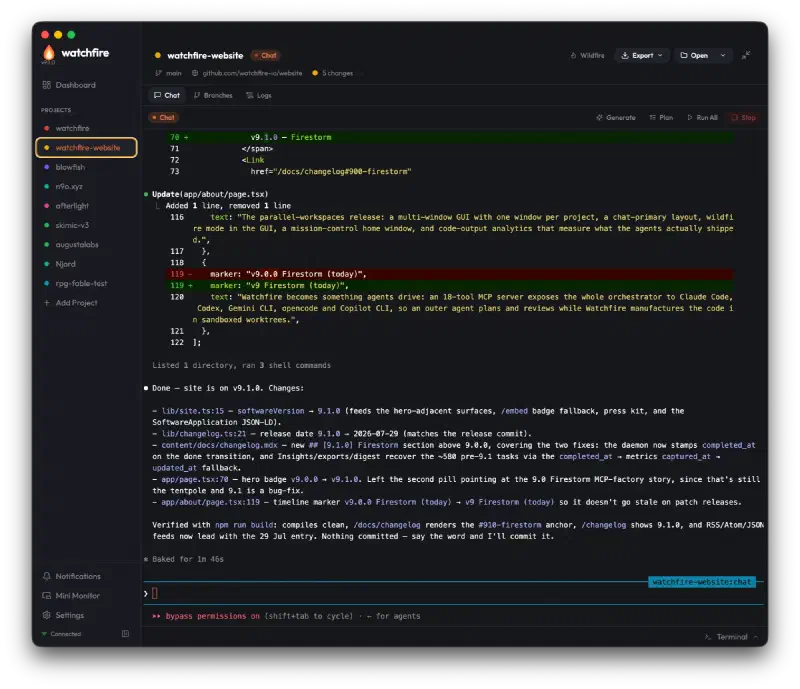
The reason none of this is a gimmick is mundane. Every paper cut I felt got logged and fixed by the same machinery that caused it. Every “I wish it would…” became a draft task in seconds, and the distance between noticing a gap and shipping the fix collapsed to hours. That doesn’t prove Watchfire has the right surface area for your work - it proves it has the right surface area for the one workflow I could watch in full detail, every day, for six months. That happens to be a good way to build a tool. And v9 is that observation productized: if Watchfire could already build Watchfire, the only thing missing was letting your agent do the driving too.
Plugging a Chat Into the Factory#
Which brings me to the part of v9 I’ve been enjoying the most. Connecting an agent to the factory is not a config-file scavenger hunt - it’s a Settings page. Watchfire detects which agent CLIs are on your machine and writes the MCP entry into each one’s config with a single click:
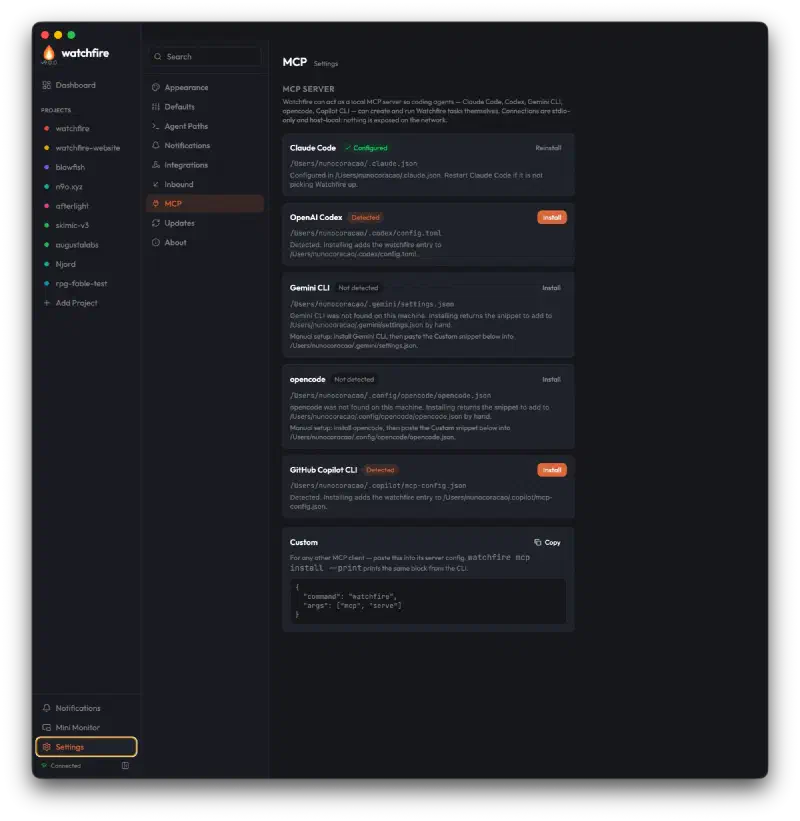
I pressed the Claude Code button, restarted a session, and a plain terminal became a Watchfire client. Ask it what’s running and it lists every registered project, tells you which one has a Wildfire loop in its execute phase, and pulls that project’s whole task queue - without a Watchfire window open anywhere.
Once you have that, a bunch of workflows stop being science fiction:
- Plan outside, manufacture inside. You brainstorm with an agent in chat - any chat - and instead of it pasting code at you, it files scoped tasks with acceptance criteria and lets Watchfire run them sandboxed, in worktrees, with merges and metrics. The conversation stays a conversation; the code happens in the factory.
- Cross-project work from one seat. A session sitting in this blog’s repo can file a bug it just found in Watchfire’s repo, or kick off a docs update on the website project, without changing directories or windows.
- Agents reviewing agents. The outer agent reads
get_task_diffafter a run and decides whether to file a follow-up - a reviewer loop where the reviewer never touches the worktree. - Bug reports that write themselves. The first thing I asked a connected session for was a project’s insights, and it handed back a wall of zeros: historical tasks had never had
completed_atstamped, so every metric keyed off it read empty. That became a task, and the task became v9.1 two days later. The outer agent found the bug by using the factory.
The factory metaphor stops being a metaphor at this point. Watchfire handles the manufacturing - isolation, execution, merging, bookkeeping - and anything that speaks MCP can stand at the order desk.
The Stress Test: Neon Fable#
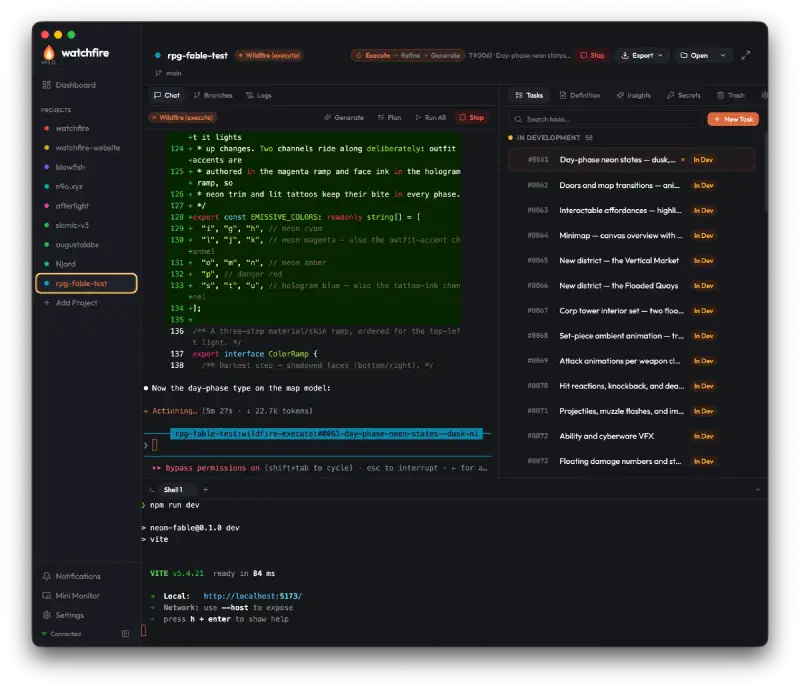
To find out whether v9 actually holds up, I pointed it at something deliberately unreasonable: rpg-fable-test, a browser-based cyberpunk RPG called Neon Fable, built almost entirely by Wildfire, with me mostly writing the project Definition and watching the queue burn down.
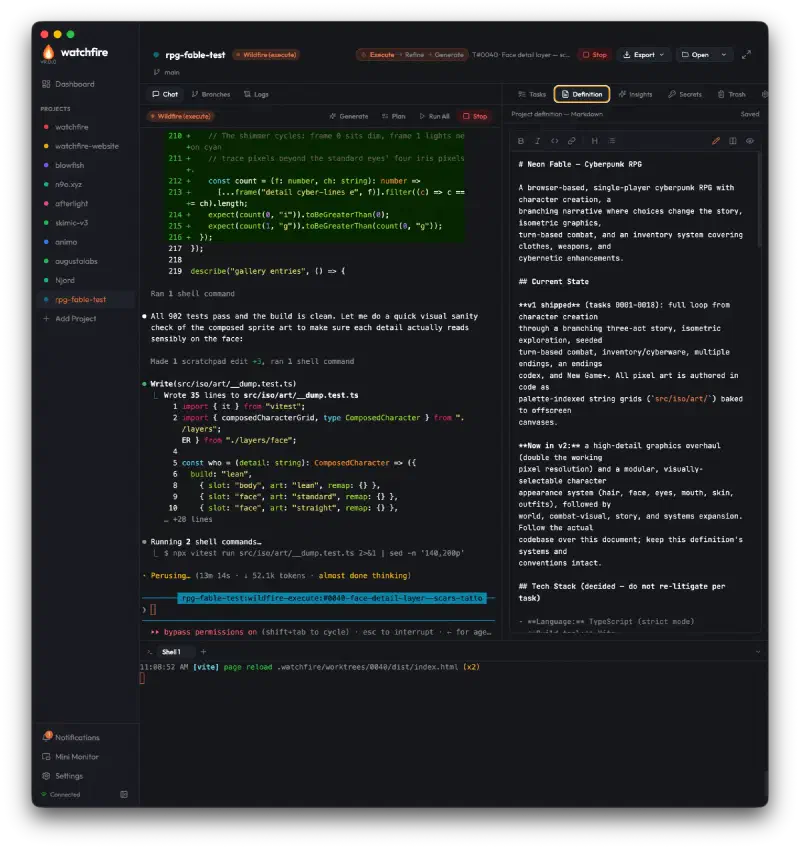
The v1 queue took the game from npm create vite to a finished loop: character creation, a branching three-act story, seeded turn-based combat, inventory and cyber-enhancements, multiple endings, an endings codex, New Game+. All pixel art authored in code as palette-indexed string grids, because that’s what an agent can iterate on. The v2 queue - a high-detail graphics overhaul and a modular character appearance system - was generated by Wildfire itself. The project now stands at 119 tasks, 103 of them done and merged, with a test suite that passed 902 tests around task #40 and has only grown since.
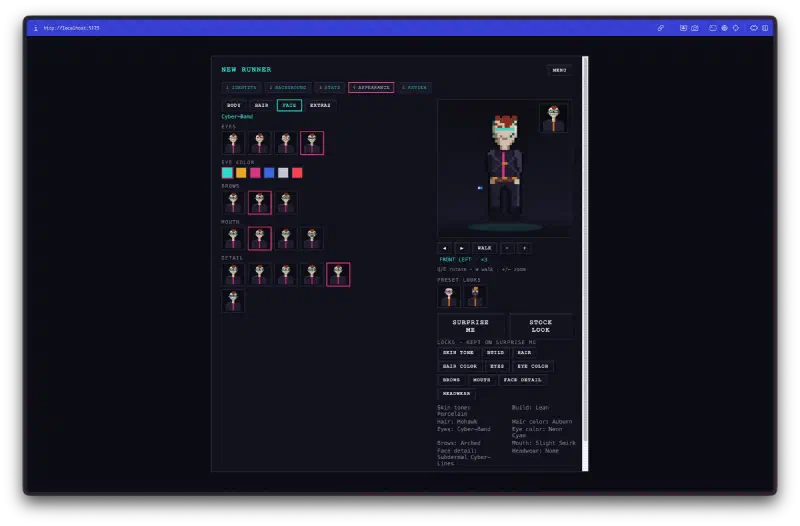
And this is what comes out the other end. The character creator is the whole v2 appearance system made visible - layered sprite composition, per-slot catalogs, live preview, lockable randomize:
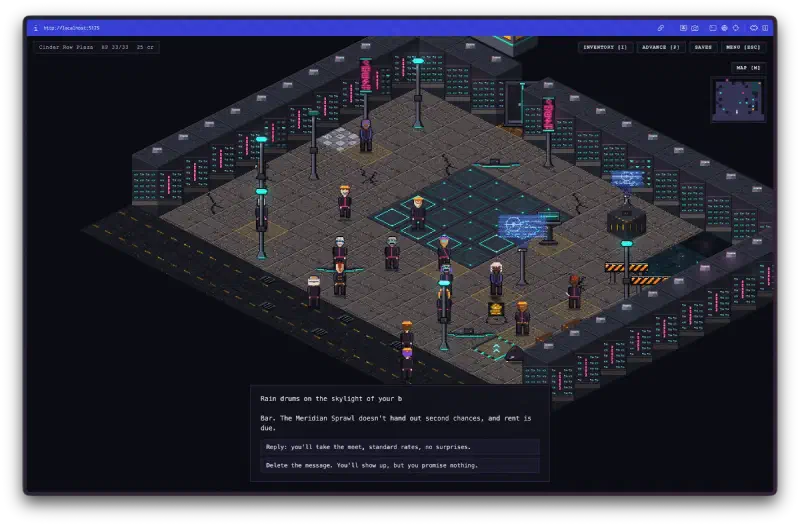
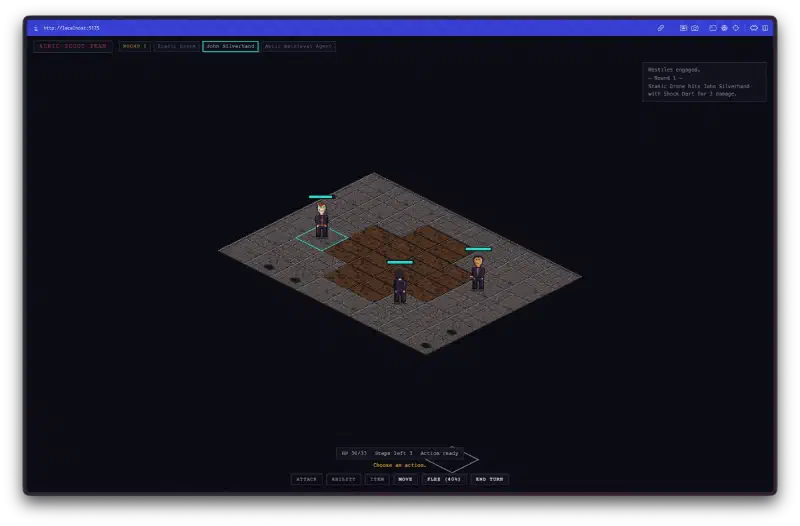
Neon Fable isn’t a product and won’t become one. It’s a demo project, built to see what happens when the factory is pointed at something awkward. You can play it in a browser and read the code. As a stress test it has already answered the question: it doesn’t just fix its own bugs and write its own docs - given something as fiddly as pixel art and game feel, it keeps shipping.
The Other Half: Projects That Are Mostly Thinking#
Neon Fable is the flashy case, and it’s also the misleading one. It makes Watchfire look like a machine for generating code you didn’t write - which is the half of the workflow that photographs well, and the half I trust least.
The two newest projects on my dashboard are the opposite. Anima is a personal-agent product - one persistent agent per person - and FitQuest is a fitness tracker that gamifies metrics from every device you own. Both have real ambitions. Neither has a product codebase yet. What they have is a docs/ directory, a decision log, and a project Definition whose first rule is docs are the source of truth; code follows docs, never the reverse.
So the tasks look nothing like Neon Fable’s:
- “Sharpen the wedge - first user, hero use case, interface model (recommend, do not lock)”
- “Framework evidence brief for the KMP vs Flutter decision - research only, do not decide”
- “Contrast and colour-vision audit of the HUD palette”
- “MDR-safe copy rules into brand voice, and audit every user-facing string in the PoC”
Read those parentheticals again. They’re instructions not to be autonomous - file the evidence, flag the trade-offs, leave the decision to me. Anima’s Definition carries the same posture as a standing rule: anything marked locked is settled, and if a task exposes a gap or contradiction, the agent is told to stop, surface it, fix the doc, then continue rather than invent a direction. FitQuest’s says to fail the task outright - success: false with a reason - rather than go off the documented trail.
That turns the same machinery into something closer to a research assistant with a paper trail: work gets scoped, sandboxed, executed and merged exactly as before, but what lands in the diff is a decision brief or a doc update instead of a feature. The Definition isn’t context-stuffing at that point; it’s governance.
Both projects do have artifacts, because you eventually have to look at the thing:
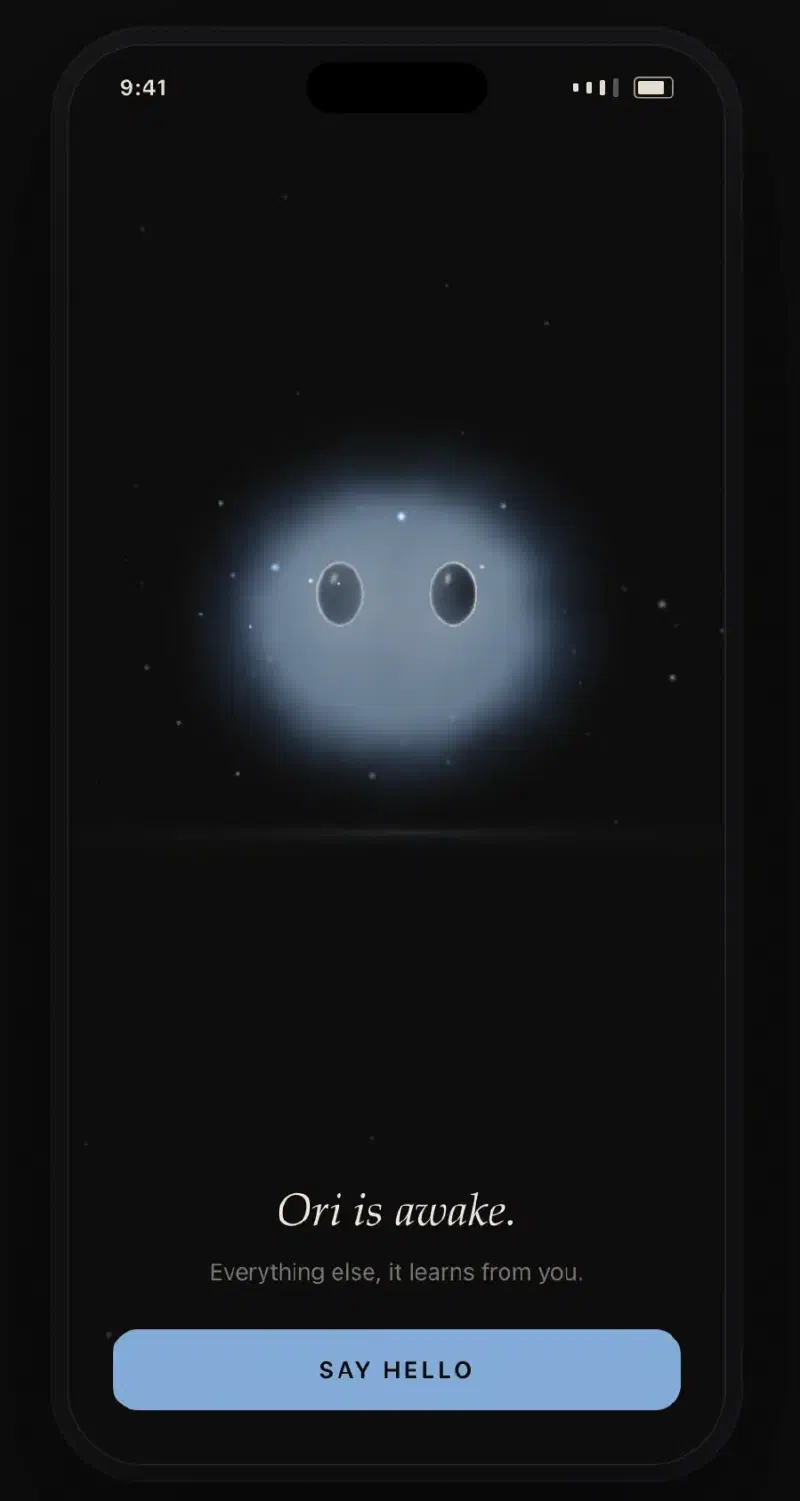
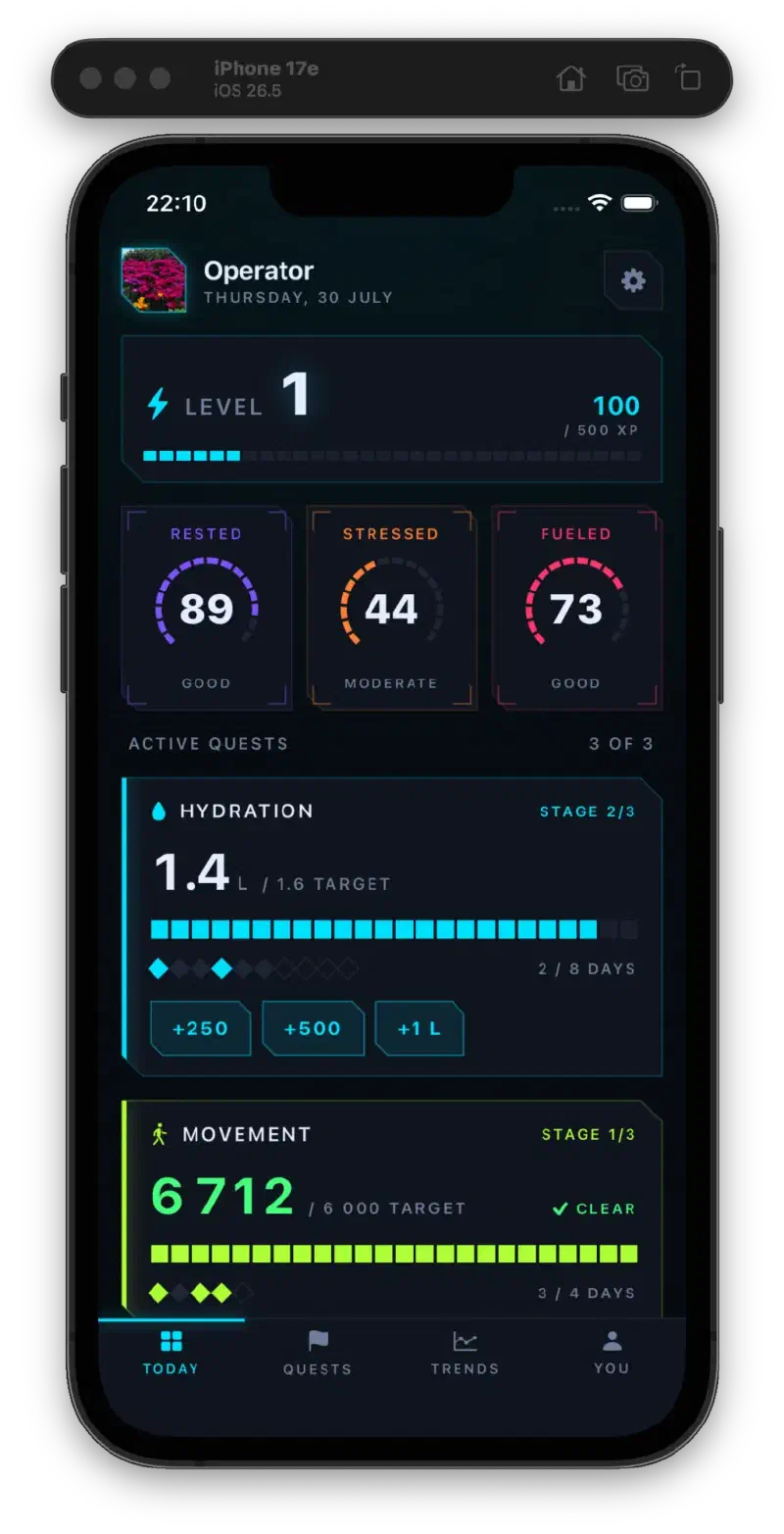
A hundred and three merged tasks on the game; thirty-eight carefully-fenced ones across the other two. Same daemon, same worktrees, same sandbox. The difference is entirely in how the Definition is written - which is the actual lesson six months in, and the one I’d hand to anyone starting out: the tool is only as good as the brief you give it, and knowing when to tell it not to decide is most of the skill.
How It Got Here#
The first version wasn’t even called Watchfire. It was FORGE - a single Electron window with a project selector, a task list, and an embedded terminal running Claude Code. Rough: thin task model, garbled output, switching projects meant restarting the app. But the core idea was already there - queue work, watch it execute, don’t touch the terminal directly.
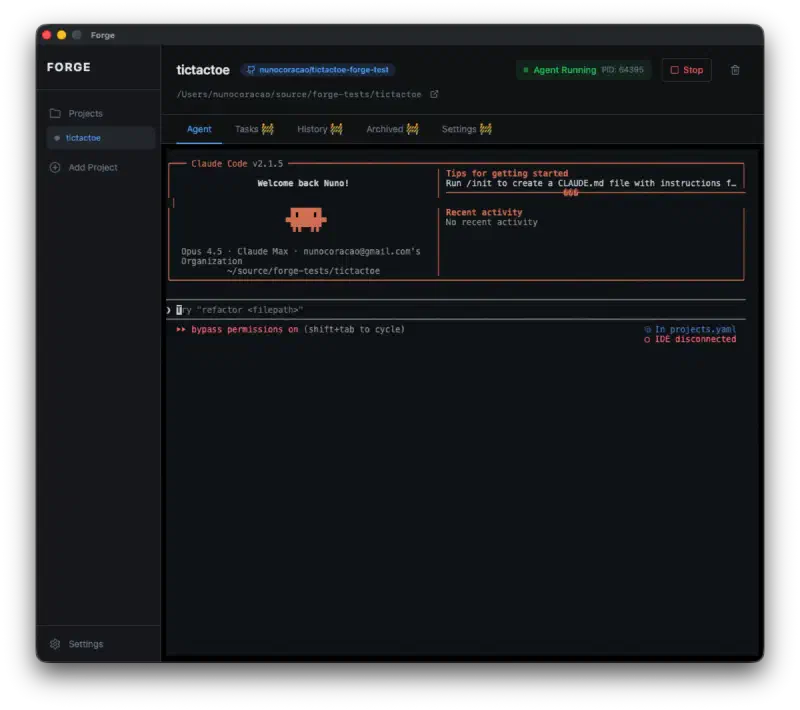
By early February I restarted the repo from scratch in Go - gRPC instead of HTTP, YAML instead of SQLite, three binaries instead of one Electron monolith. That’s the codebase still running today. Then April happened, and the versioning picked up a theme: every major release is fire-coded, and the cadence tells you exactly what hurt that month.
- v1.0 “Ember” (early April) - first real release. Transcript discovery from Claude Code’s
~/.claude/projects/, a restart-loop guard after three crashes, the Seatbelt fix for~/Desktopprojects. - v2.0 “Spark” (mid-April) - the pluggable backend interface. Codex, opencode and Gemini CLI ship the same day, with per-task agent override and per-session config isolation.
- v3.0 “Blaze” (late April) - Copilot CLI as the 5th backend, plus a fortnight of bleeding stopped: a cross-filesystem
EXDEVbug that ate Linux updates, task-list rotation, GUI update loops. - v4.0 “Beacon” (day 28) - the turning point from task runner to operations tool. Dashboard rebuild, per-task metrics, Insights, exports, weekly digest, OS notifications, Slack/Discord/webhook relays with signature verification, GitHub auto-PR.
- v5.0 “Flare” (day 30) - OAuth Slack and Discord bots, an inbound HTTP server with rate limiting and idempotency, GitLab/Bitbucket merge parity, and a fix for
run-allsilently halting on merge failure. Turns out a silent dashboard is the second-worst dashboard. - v6.0 “Phoenix” (early May) - atomic YAML writes, the
flocksingleton daemon, Cursor Agent as the 6th backend, and a TUI that grew real scrollback. - v7.0 → v7.4 “Forge” (May-June) - yes, the original name, recycled as a codename long after the thing it belonged to had been rewritten away. Task reordering everywhere, a chat viewport that stops snapping to the top, focus-chat mode, and my favorite war story: a daemon log finally size-capped after one user’s grew to 300 GB on disk before anyone noticed (post-mortem).
- v8.0 “Inferno” (end of June) - one OS window per project, a mission-control home window, the Wildfire GUI, the Mini Monitor, and code-output metrics that measure shipped code rather than closed tasks. (release post)
- v9.0 “Firestorm” (July 26) - the role inversion: an 18-tool MCP factory, stdio-only, with a
--read-onlymode and safety rails throughout. (release post) - v9.1 (July 29) - the
completed_atfix from a few sections ago, back-filling ~580 historical tasks so Insights, exports and the digest all light up.
One more screenshot, and then look back at the one that opens this post:
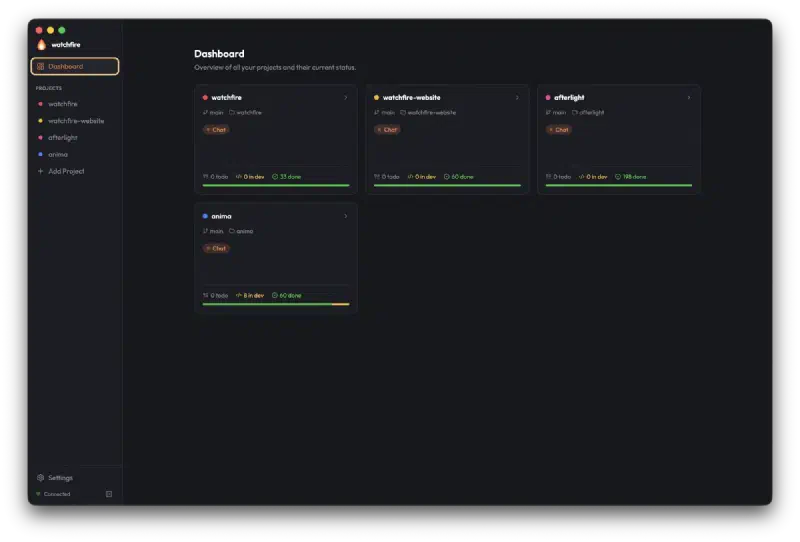
Fourteen weeks between those two. Same tool.
What’s Next#
- More agent backends as they appear. The
Backendinterface is the single integration point - anything that speaks shell and produces a transcript can join. - A wider MCP surface: richer inspection tools, and letting long-running outer agents supervise whole fleets rather than single projects.
- Better diff and review tooling. The inline viewer is in; what’s missing is a proper PR-style “review then merge” surface for tasks that need a human eye.
- Team workflows. The file-based task model already survives git - shared task lists and review surfaces are the natural extension.
Try It#
On macOS, installing is one line:
brew tap watchfire-io/tap && brew install --cask watchfire-io/tap/watchfireEverything else: download the latest release · docs · changelog · blog
If you’re juggling more than one AI agent and have caught yourself alt-tabbing between terminals, it might be the thing you’re missing. It was for me.
Six months, nine releases, and one tool that ended up building itself. The version of “vibe coding” where you still have to ship something at the end of the day.